Eventbrite Clone App Development: Features, Cost & Business Model
Build an Eventbrite clone with event discovery, ticketing, secure payments, organiser tools, and admin controls. Launch a scalable event platform with CloneAppz.
13 min read
The event technology industry has transformed the way people discover, organise, promote, and attend events. From conferences and workshops to concerts, festivals, networking sessions, and private gatherings, users increasingly expect a seamless digital experience for finding events and purchasing tickets. At the same time, event organisers need reliable software to manage registrations, ticket sales, attendees, promotions, payments, and analytics from a single platform.
An event marketplace similar to Eventbrite can bring organisers and attendees together through a scalable digital ecosystem. Businesses can launch their own branded event management platform instead of building every component from scratch. An Eventbrite clone can provide the core functionality required for event discovery, event creation, ticketing, payments, attendee management, notifications, and administration while allowing businesses to customise the platform according to their target market.
For startups and established businesses, the objective is not to copy another platform's branding or proprietary implementation. Instead, the focus is on developing a feature-rich event marketplace inspired by an established business model and adapting it to a specific audience, geography, pricing strategy, and operational requirement.
What Is an Eventbrite Clone App and How Does It Work?
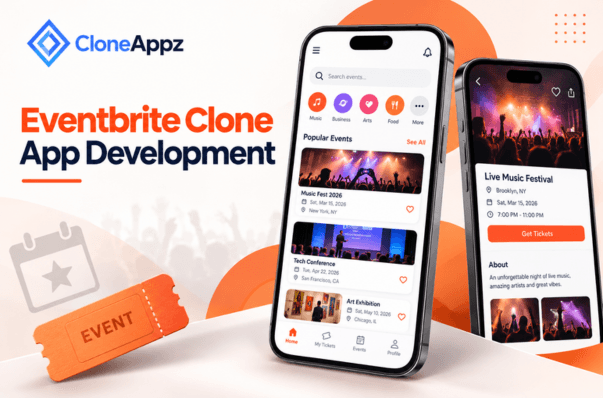
An eventbrite clone is a ready-to-customise event management and ticketing platform designed to connect event organisers with attendees. It typically consists of an attendee application or website, an organiser dashboard, an administrator panel, and backend infrastructure that coordinates events, bookings, payments, notifications, and user accounts.
The platform allows organisers to register, create event listings, upload event images, define schedules and venues, configure ticket categories, establish pricing, set attendee limits, and publish events. Attendees can search for events using categories, locations, dates, prices, and other filters before purchasing tickets through integrated payment gateways.
A typical workflow begins when an organiser creates an event and submits its information through the organiser dashboard. The system stores the event details in the backend and makes the approved event available to users. Attendees browse the marketplace, select an event, choose their preferred ticket type, complete payment, and receive a digital ticket or confirmation.
The backend then updates ticket inventory and booking information in real time. Organisers can monitor sales, attendee numbers, check-ins, and revenue through their dashboards, while administrators can manage users, events, transactions, commissions, disputes, and platform settings.
This architecture makes the platform suitable for different event categories, including business conferences, educational seminars, entertainment events, sports activities, community gatherings, exhibitions, workshops, and networking events.
Why Invest in Eventbrite Clone Development?
The growing adoption of online event discovery and digital ticketing creates opportunities for businesses that can provide a specialised experience for a particular audience. Instead of competing solely as a general-purpose event marketplace, a new platform can focus on a niche such as corporate events, local festivals, professional networking, educational events, nightlife, sports, or community activities.
Eventbrite clone development also provides flexibility over the platform's business model. A company can generate revenue through ticket commissions, organiser subscriptions, featured event listings, advertising, service fees, premium analytics, or a combination of these models.
Another important advantage is customisation. A business can create its own brand identity, introduce region-specific payment methods, support local currencies, implement custom event categories, and develop features based on user behaviour.
For startups, MVP development can be used to validate the concept before investing in a large-scale platform. The initial version can focus on essential functionality such as registration, event publishing, search, ticket booking, payments, notifications, and basic analytics. Once the platform begins generating user feedback and transaction data, advanced functionality can be introduced progressively.
Essential Features to Include in an Eventbrite-Like Platform
A successful event platform requires separate functionality for attendees, organisers, and administrators. The following features form the foundation of a scalable event marketplace.
User Registration and Profile Management
Users should be able to register using email, phone number, or supported social login options. Profile management can allow attendees to update their names, profile images, contact information, interests, and notification preferences.
The platform can use user preferences and booking history to provide personalised event recommendations. Organisers should have separate profiles containing business information, contact details, previous events, ratings, and relevant verification information.
Event Discovery and Advanced Search
Event discovery is one of the most important components of the platform. Users should be able to find events using keywords, categories, locations, dates, ticket prices, event formats, and availability.
Advanced filtering can help users narrow down large event inventories. Location-based discovery can display events near the attendee, while recommendation systems can suggest events based on previous searches, bookings, interests, and browsing activity.
Event Creation and Management
Organisers need a comprehensive interface for creating and managing events. The event creation workflow can include event name, description, images, venue, date, start and end time, event category, organiser information, ticket types, capacity, refund policies, and terms.
Organisers should also be able to edit event details, pause ticket sales, duplicate existing events, cancel events, and monitor registrations.
Ticketing and Registration Management
The ticketing system should support multiple ticket categories, such as early bird, standard, VIP, group, student, and complimentary tickets. Each ticket type can have its own price, quantity, availability period, and purchase restrictions.
The system should automatically update inventory after each successful transaction to reduce the possibility of overselling. Digital tickets can contain unique QR codes or barcodes that are scanned during event check-in.
Secure Online Payments
Payment functionality enables attendees to purchase tickets directly through the platform. Depending on the target market, the platform can support credit and debit cards, digital wallets, bank transfers, and regional payment methods.
Payment processing should be separated from the application's core business logic where appropriate, with transaction status, refunds, failed payments, and settlement records securely maintained.
QR Code Ticketing and Event Check-In
Digital ticketing can make event entry faster and more efficient. After purchasing a ticket, users can receive a unique QR code through the application and email.
Organisers can use a dedicated check-in interface to scan tickets at the venue. The backend verifies whether the ticket is valid, already used, cancelled, or associated with the correct event.
Notifications and Reminders
Notifications can keep users informed throughout the event lifecycle. The platform can send booking confirmations, payment receipts, event reminders, schedule changes, cancellation notifications, and promotional messages.
Push notifications can be implemented alongside email and SMS communication. A notification preference system should allow users to control the type and frequency of communications they receive.
Organiser Dashboard
The organiser dashboard should provide visibility into event performance. Key metrics can include tickets sold, gross revenue, net revenue, attendee count, remaining inventory, conversion rate, refunds, and check-in status.
Organisers can also use the dashboard to manage events, view attendee information, communicate with attendees, and download reports.
Reviews and Ratings
After an event, attendees can be encouraged to provide ratings and reviews. Reviews can improve transparency and help future attendees make informed decisions.
To maintain quality, the platform can include moderation tools that allow administrators to review reported content and remove inappropriate or fraudulent submissions.
Admin Dashboard
The admin panel provides centralised control over the entire platform. Administrators can manage users, organisers, events, ticket categories, payments, commissions, refunds, promotional campaigns, reported content, and platform settings.
Role-based access control can also be introduced so different administrative employees receive access only to the sections required for their responsibilities.
Advanced Features for a Competitive Event Marketplace
Once the core platform is stable, businesses can introduce advanced functionality to improve engagement and operational efficiency.
AI-powered recommendations can analyse user interests, previous bookings, location, event categories, and browsing behaviour to recommend relevant events. Personalised recommendations can increase discovery without requiring users to manually search through hundreds of listings.
Dynamic pricing can allow organisers to adjust ticket prices according to demand, booking periods, inventory levels, or promotional campaigns. This can be particularly useful for large events with multiple ticket phases.
An event waitlist can automatically notify users when additional tickets become available. This feature helps organisers recover potential sales when events reach capacity.
Businesses can also introduce referral programmes that reward users for bringing new attendees to the platform. Referral tracking can be connected with account-level rewards or promotional credits.
Live event functionality can support virtual or hybrid events through video streaming, live chat, speaker sessions, digital networking, and online ticket access. Depending on the requirements, third-party video services can be connected through API integration.
Technology Stack for Eventbrite Clone Development
The technology stack should be selected according to scalability, expected traffic, security requirements, and platform functionality.
For mobile applications, Flutter or React Native can support cross-platform development, while native Android and iOS technologies can be considered when platform-specific functionality is required.
The frontend can be developed using technologies such as React.js or Next.js for responsive web experiences. Backend development can use Node.js, Laravel, Django, or another suitable framework depending on project requirements.
Databases such as PostgreSQL or MongoDB can manage users, events, bookings, tickets, transactions, and related data. Redis can be introduced for caching, session management, and high-speed data operations.
Cloud infrastructure from providers such as AWS, Google Cloud, or Microsoft Azure can support scalable hosting, storage, databases, backups, monitoring, and content delivery.
Third-party services can also be connected for payment processing, maps, emails, SMS, push notifications, authentication, analytics, and communication. Proper API integration helps the platform exchange data with external services without unnecessarily rebuilding functionality that already exists through established providers.
How to Build an Eventbrite-Like App Step by Step
Developing an event marketplace requires more than creating mobile screens. The development process should cover product planning, UI/UX, backend engineering, integrations, testing, deployment, and ongoing maintenance.
Step 1: Define the Target Audience and Business Model
Before development begins, identify the audience the platform will serve. A general event marketplace requires a different feature set from a platform focused exclusively on corporate conferences, music festivals, educational workshops, or local community events.
The target market also influences payment methods, currencies, languages, event categories, compliance requirements, and marketing strategy.
Step 2: Define the MVP Scope
The next stage is defining the minimum viable product. An MVP should include only the functionality required to launch and validate the business concept.
Typical MVP functionality includes user registration, event creation, event discovery, ticket booking, payment processing, digital tickets, notifications, organiser management, and an admin dashboard.
This approach can reduce initial development costs and allow businesses to collect real user feedback before expanding the product.
Step 3: Design the User Experience
The UX design should make event discovery and ticket booking straightforward. Important screens may include onboarding, home, search, event details, checkout, ticket wallet, booking history, organiser dashboard, event creation, and profile management.
The interface should remain responsive across different screen sizes and provide clear information about ticket prices, event schedules, locations, availability, and refund policies.
Step 4: Develop the Backend and Core Platform
Developers then build the application's backend, database structure, APIs, authentication, booking engine, payment processing, notification system, and administrative functionality.
Security should be considered throughout development rather than added at the end. Authentication, authorisation, encryption, input validation, secure payment handling, and database protection are essential for a platform processing personal and financial information.
Step 5: Add Third-Party Integrations
External services can be integrated for maps, payments, email, SMS, analytics, authentication, calendar synchronisation, video streaming, and other functionality.
The selection of integrations should depend on the platform's geographical market and business requirements. A modular integration architecture also makes it easier to replace a third-party service later if pricing, availability, or business requirements change.
Step 6: Test, Deploy, and Monitor
Testing should cover functional workflows, payment transactions, ticket inventory, account security, device compatibility, performance, API reliability, and administrative processes.
After deployment, monitoring tools can track server health, application errors, transaction failures, response times, and user behaviour. Regular updates are necessary to maintain security and compatibility as operating systems, browsers, and third-party services evolve.
Eventbrite Clone App Development Cost
The cost of developing an event marketplace depends heavily on its scope, technology stack, design complexity, integrations, number of platforms, and development team.
A basic MVP may require approximately $6,000 to $12,000 when it focuses on essential event discovery, ticketing, payments, user management, and administration.
A mid-level platform with advanced organiser functionality, multiple integrations, analytics, enhanced ticketing, and recommendation features may range from approximately $12,000 to $20,000.
A more advanced solution with sophisticated automation, AI-based recommendations, hybrid event functionality, advanced analytics, scalable infrastructure, multiple applications, and extensive customisation can reach approximately $20,000 to $30,000 or more.
Businesses should treat these figures as indicative ranges rather than fixed quotations. The final development budget depends on the exact product requirements and implementation approach.
Working with an experienced clone app development company can also help businesses determine which features should be included in the first release and which can be introduced during subsequent development phases.
Business Model and Monetisation Strategies
An event platform can use multiple revenue streams rather than relying on a single source of income.
Ticket Commission
The platform can charge organisers a percentage of each ticket transaction. This creates a direct relationship between platform revenue and event sales.
Service and Booking Fees
A fixed or variable service fee can be applied to ticket purchases. Businesses can decide whether the fee is paid by organisers, attendees, or shared between both.
Organiser Subscription Plans
Organisers can choose from different subscription tiers based on event volume, analytics, promotional tools, attendee limits, and advanced functionality.
Featured Event Promotion
Organisers can pay to promote their events within search results, category pages, home page sections, or recommendation areas.
Advertising
The platform can sell advertising space to relevant businesses such as venues, event suppliers, hotels, transportation companies, educational providers, and entertainment brands.
Premium Analytics
Advanced reports can be offered as a premium feature, providing organisers with deeper insights into sales performance, attendee demographics, conversion rates, traffic sources, and campaign performance.
Why Choose CloneAppz for Eventbrite Clone Development?
CloneAppz provides clone app development services for businesses looking to launch customised digital platforms based on proven marketplace and application concepts.
For an event platform, CloneAppz can help transform the initial business concept into a branded solution with attendee applications, organiser functionality, administrative controls, ticketing, payment integrations, notifications, analytics, and scalable backend infrastructure.
The development approach can be adapted according to the client's target market and business model rather than forcing every project into the same feature structure. Businesses can begin with an MVP and progressively add advanced capabilities as their platform grows.
Custom branding, UI/UX modifications, third-party integrations, payment gateways, event categories, subscription models, and other business-specific requirements can be incorporated into the development roadmap.
How to Make Your Event Platform Scalable and Secure
Scalability should be considered from the beginning because event platforms can experience sudden traffic spikes when popular events open for registration or ticket sales.
Cloud-based infrastructure, caching, database optimisation, load balancing, CDN implementation, asynchronous processing, and horizontal scaling can help manage high traffic volumes.
Security is equally important. The platform should implement secure authentication, role-based permissions, encrypted communication, secure payment processing, rate limiting, fraud monitoring, data backups, and regular security testing.
The architecture should also separate major services where appropriate. For example, authentication, event management, ticket inventory, payments, notifications, and analytics can be designed as modular components, making the system easier to maintain and scale.
Final Thoughts
An Eventbrite-style platform can create a strong digital marketplace for event organisers and attendees by combining event discovery, ticketing, payments, organiser management, and attendee engagement within one ecosystem. The most practical development strategy is to begin with a clearly defined MVP, validate the business model, and then expand into advanced features based on real user requirements.
From event creation and digital tickets to payment processing, analytics, recommendations, and automated notifications, each component should be designed around usability, security, scalability, and long-term business growth. With the right technology architecture and a structured development approach, businesses can launch a customised event marketplace under their own brand and build additional revenue streams over time.
Frequently Asked Questions
An Eventbrite clone app is a custom event management and ticketing platform inspired by the functionality of established event marketplaces. It can include event discovery, ticket booking, payments, organiser dashboards, digital tickets, notifications, reviews, analytics, and administration.
The cost depends on the number of platforms, features, integrations, design requirements, backend architecture, and development complexity. A basic MVP can start around $6,000 to $12,000, while advanced platforms can cost $20,000 to $30,000 or more.
Yes. A platform can be customised for corporate events, conferences, workshops, concerts, sports events, educational programmes, community events, festivals, or other specialised markets.
Development time depends on the project scope. A focused MVP may take several weeks, while a feature-rich platform with multiple applications, integrations, advanced analytics, and complex administration can require several months.
Yes. Cross-platform frameworks such as Flutter and React Native can be used to develop applications for both Android and iOS. Native development can also be selected when platform-specific functionality is required.
Payment gateway selection depends on the target market. The platform can support card payments, digital wallets, bank-based payment systems, and regional payment providers through secure APIs.